Freeze Panes locks rows, columns, or both to the top rows and left columns in a Tabulate sheet. Locked rows or columns stay in position and the rest of the sheet moves past them when scrolling or panning.
Freezing Panes
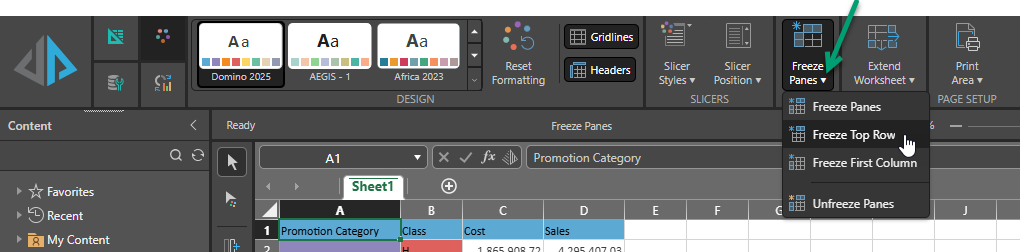
You access Freeze Panes (green arrow below) from the Design ribbon:
- Position your cursor on the cell from which you want to freeze panes.
- Select Freeze Panes > <Freeze Options> from the dropdown list, where <Freeze Options> are:
- Freeze Panes: Freezes (locks) the row above and the column to the left of the selected cell.
- Freeze Top Row: Freezes (locks) the top row, regardless of the cell selected.
- Freeze First Column: Freezes (locks) the first column, regardless of the cell selected.
- Unfreeze Panes: Clears the frozen (locked) row and/or column.