Slicers help your readers to filter or narrow-down the information that they see in their presentation and can take different forms to satisfy different reader requirements. Those forms (or slicer types) can be changed when you are designing your presentation. As an example, you might switch from a dropdown list to buttons (or vice-versa) to improve the usability of your presentation; buttons may be quicker to use and let you see all options at-a-glance, while dropdown lists save space when there are many options.
In Present Lite, the Change Slicer Type option controls this function. You can change the selected slicer as needed, but be aware that the option you select will need to occupy sufficient space to be usable.
Changing your Slicer Type
To change your slicer type:
- Select the Slicer whose type you want to change on your Canvas.
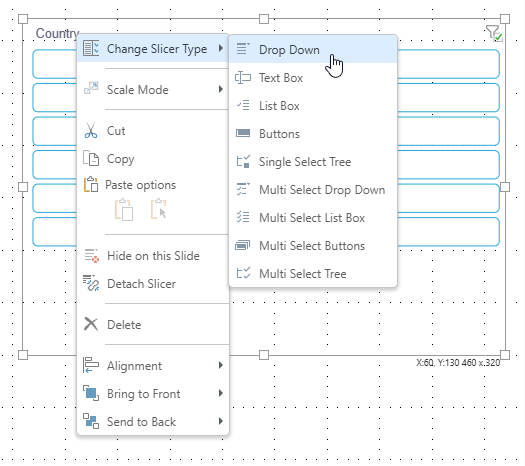
- Right-click Change Slicer Type > <Slicer Option>.
- Optionally, change the position, size, or settings of your Slicer to ensure it is usable by your reader.
The Slicer Types that may be available for selection are listed below. Note that Date Calendar is only offered for selection where the slicer has the relevant type.
The "type" used for your Slicer is updated.
In the preceding example, the Slicer buttons are changed to a dropdown list. In both cases, the options come from the Country slicer; the difference is that buttons typically allow you to see the options all at once while the dropdown list may be more appropriate for a longer list of options.
Slicer Types
Slicers aren't just dropdown lists, you can add buttons, a tree, or even a date-time calendar to filter your presentation assets. The list of available types include:
- Drop Down: Adds a dropdown list that you can select one slice from.
- Multi Select Drop Down: Adds a dropdown list that you can select multiple slices from.
- Single Select Tree: Supports 'regular' hierarchies in both cube and SQL models. Adds a single-select tree, which you can navigate through to find the relevant element.
- Multi Select Tree: Supports 'regular' hierarchies in both cube and SQL models. Adds a multi-select tree, which you can navigate through to find and select relevant elements.
- List Box: Adds a single-select list within a box container.
- Multi Select List Box: Adds a multi-select list within a box container.
- Text Box: Adds a textbox with dropdown.
- Buttons: Adds single-select buttons, rather than a list.
- Multi Select Buttons: Adds multi-select buttons.
- Date Calendar: This calendar tool is a specialized slicer visualization designed to make it easier to use date-time hierarchies and their associated calculations. The date-time picker is automatically generated at runtime when using the dateKey hierarchy to create a slicer. As with other slicers, the date-time picker slicer can be customized from the slicer settings.
Date-Time Pickers are only supported for SQL models. This functionality is not currently supported for MS OLAP, Tabular, or SAP BW.
A Toggle is a special slicer visualization type that is only applicable to global binary parameters.
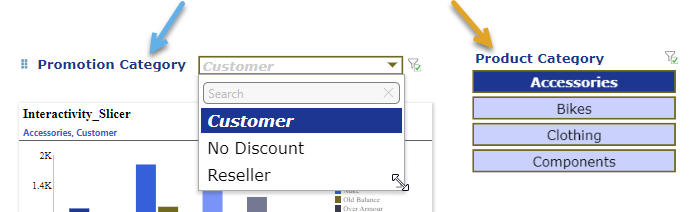
The following example shows a dropdown list (blue arrow below) and a set of single-select buttons (orange arrow) as they might appear in a presentation when viewed at runtime: