Themes allow end users to quickly and consistently style content between different visuals and reports and across applications. The theme manager provides an interface for admins to add, edit and remove the various design themes.
Note: The product comes preloaded with example themes that can be modified, copied, or removed as needed.
Beware: The system requires at least one theme to operate.
Theme Manager
The theme manager shows all existing themes and can be used to access and edit existing themes, create new themes, and manage themes.
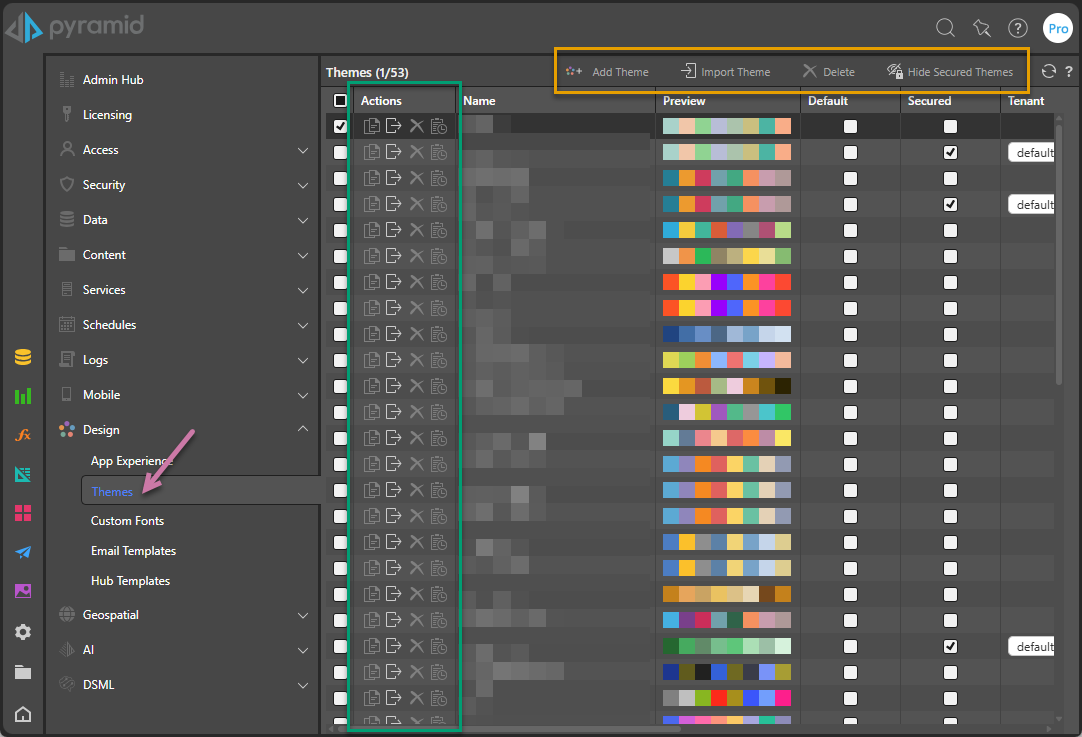
Actions
For each existing theme, Admins can use the Actions (green highlight above) to:
- Click Duplicate to create a copy of the existing theme.
- Click Export to export the theme as a PAT file that can be used to "port" the theme between different instances of Pyramid.
- Click Delete to remove a theme that is no longer needed. Removing unneeded themes can have a positive impact on performance.
- Click Audit Trail to view the audit trail for this object type.
Edit an Existing Theme
Click the row representing a theme to launch the theme editor, where the theme template can be edited.
Overhead menu
Admins can use the macro buttons at the top of the manager (orange highlight above) to:
- Add Theme: Create a new theme, starting with a new, blank, theme template. The new template opens in the theme editor.
- Import Theme: Import a previously exported theme file (a "PAT" file). If your import action results in an error, see below.
- Delete: Remove all selected themes.
- Hide Secured Themes: Get a clearer view of themes in the system by hiding secured themes from the manager list. This option also hides the related Secured checkbox and Tenant column.
Columns
Default
Select one checkbox in the Default column to select the theme to use as the system default. The default theme is used whenever a new presentation or publication is created, unless that default has been overridden by a tenant default.
Secured by Tenant
Select the Secured checkbox and then select a Tenant from the dropdown list to restrict the theme to that selected tenant. Users can't see or select themes secured for tenants that they do not belong to. (Non-secured themes are visible to all users on the system.)
Related information
PAT / PIE Files
From Pyramid 2025.02 onwards, hardened security infrastructure has necessitated a change to the internal format of PAT files. If you are importing an older PAT file (exported from Pyramid 2018 or Pyramid 2020 versions) and receive the following error message, follow the provided link to an online utility to convert older PIE and PAT files to the new format.
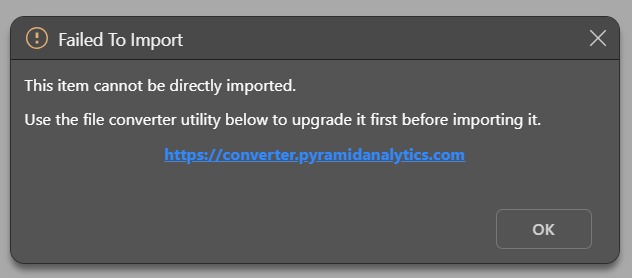
See PIE and PAT export file converter for more details.
Custom Themes for Embedded content
Developers can override themes (in whole or in part), via APIs when embedding Pyramid content into a hosted application.
- Click here for more on custom themes and the custom theme overrides.