Smart models can easily be re-processed, which is crucial in ensuring that the model reflects the latest data from the data source. Because the data set is copied from a file source, it's important to re-process the model when the source is updated.
Changing the Source
You can rerun the model by opening its definition file from the Content Management System:
- Once the file is opened, you will need to replace the previous file source with the new one. To do this, click the file source node on the canvas (orange arrow below) to open its Properties panel on the right.
- Go to the properties panel and click Change Source (green arrow) and upload the new file from its folder location.
- Click Save in the status bar to save changes to the model.
- To rerun the model, click Run (blue highlight above) or press F2 on your keyboard.
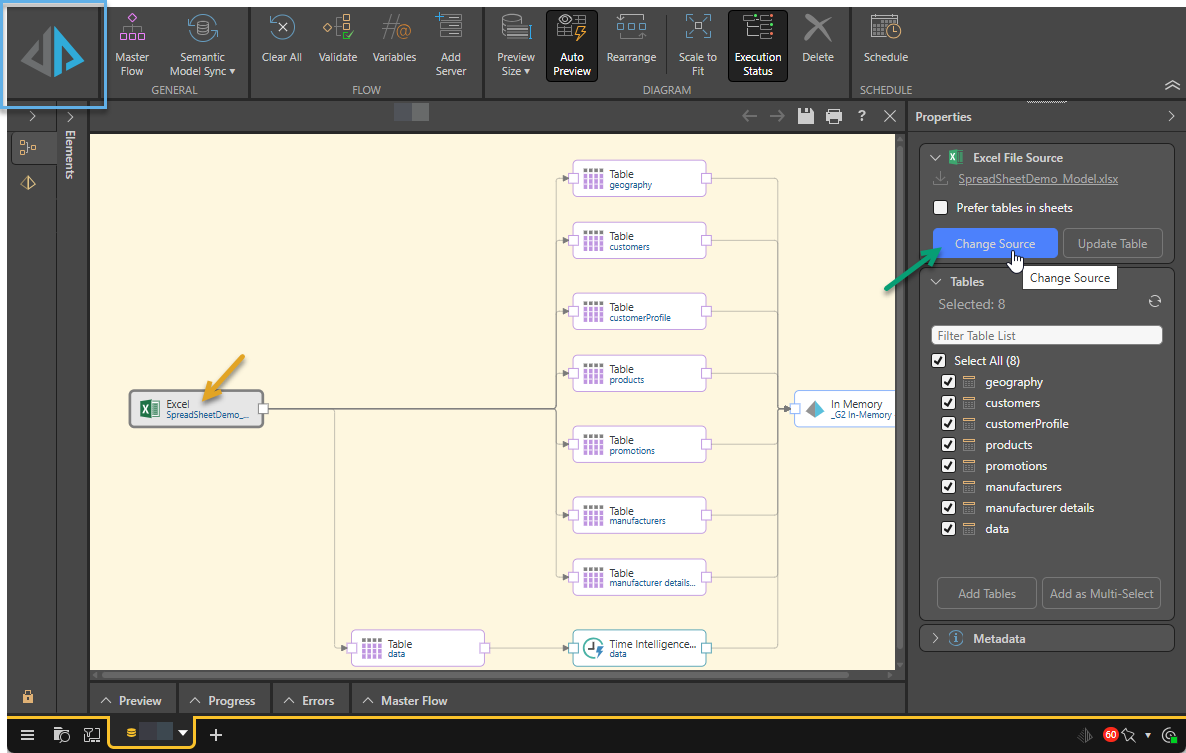
The data flow will be updated with the new source file, which will be displayed in the node's Properties panel.
By default, smart model files are saved to your personal content folder. Click here to learn how to save the file to a different directory and share with others.
Reprocessing the Model
The Processing Options dialog will open after clicking Run (above):
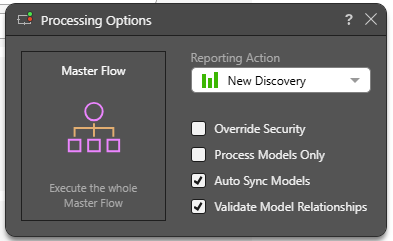
Select your processing options and click Master Flow.
- Click here to learn more about processing options.