The Viewer client is a streamlined version of Pyramid, giving non-technical users the ability to access and interact with live content. While the Pro and Lite clients enable feature-rich content-authoring across multiple apps, the Viewer is generally focused on report-consumption rather than report-building. In short, the Viewer grants "live" access to Discover and Present content, access to the rendered results from Publish, and, lastly, access to a simplified Content Manager and User Hub.
Viewer Components
Viewers have access to a streamlined application optimized to meet the needs of content consumers. The components that make up the Viewer client provide users with the tools needed to view and interact with reports that have been shared with the user.
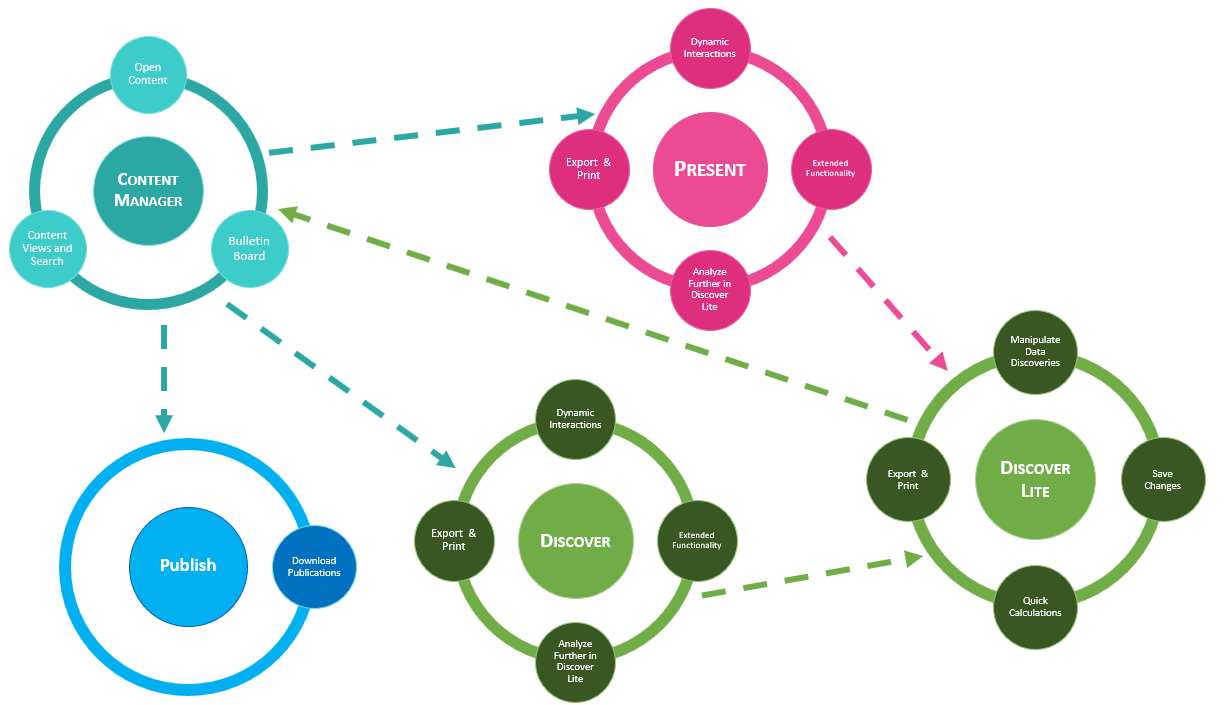
Content Manager and Bulletin Board
The content manager is the area of the tool where content items are stored. You can find these items in their folder locations in the Content Explorer, or using the various list views, like your Favorites, Recents, or Most Used.
Housed within the content manager is the Bulletin Board. The Bulletin Board is a centralized interface allowing users to see and access publications, alerts, subscriptions, and conversations that have been shared with the user.
Published Content
In the Pro and Lite clients, report-builders use the full Publish model to design static analytics reports that are then exported and shared on a scheduled basis. Publications are comprised of multiple discoveries and may include other content items across several pages. Pro users can share publications with Viewer users using the Publications Board, which the Viewer user can access through their Bulletin Board.
- Depending on your organization's license type, Pro or Analyst users may also share publications by email.
- If enabled, Viewers may also self-subscribe to existing publications, rather than have a Pro or Analyst user trigger a distribution of rendered content (see below).
Discover
Report builders use Discover to build a range of visualizations, called discoveries. In the Viewer client, discoveries are displayed in a streamlined version of Discover and can be opened from the content manager or using a direct link (a URL shared by another Pyramid user).
The Viewer user can access discoveries in the viewer; they can then dynamically explore the discovery either using interactions on the right-click or using the functions in the ribbon. Which functions and context menus are available depends on the interaction level defined by the viewer's profile. Profiles may enable functions like drill-down, quick filter, dice, and more, access extended functionality, like scheduled data alerts, conversation threads, scheduled content subscription, actions, and "analyze further" which opens discoveries in Discover Lite as described below.
Discover Lite
Discover Lite provides a simplified interface where users can quickly analyze data on the fly. Viewers can open selected queries from Discover (or Present) and then change the query as needed. You'll have access to the data model that was queried, meaning you can change all the inputs (measures and hierarchies) if required.
You can also construct formulations and print and export the discovery. Once finished, you can save the discovery to your local My Content folder.
Present
Presentations are interactive dashboards made up of multiple discoveries over a number of slides. Presentations can also include other content, like slicers, images, dynamic text, and infographics. Presentations are viewed within the Pyramid application.
Viewers can open presentations from the Content Manager or using a direct link. Viewers can dynamically interact with the queries in presentations and can cross highlight and cross filter between queries. They may also be able to access Smart Insights to expose insights about the selected visual generated using AI.
Tip: You can export and print a presentation or specified slides in the presentation and you can use the panel tools to open selected queries in Discover Lite (described above) for further analysis.
Publish
If enabled in the Admin Console, viewer users can see publications in the Content Manager. They cannot view the publication templates but can subscribe to them, receiving the output by email or as static content on their bulletin board.