 Rank (PQL)
Returns the rank of a member in the specified list. With optional techniques for calculating rank and ordering.
- Returned Output: Numeric
- Library: PQL \ Semantic \ Statistical
- Version: 2025.10.000

- Compatibility: Pyramid Query Language (PQL) data sources
Syntax
* Click on the function's arguments above for more details on the input values.
Comments
- The member can be any selected member or a functional representation of a member.
- List must be a list or set of elements from the SAME hierarchy as the member in the model.
- The optional data point or tuple describes the values used to determine the ranking. If not supplied, the member is ranked based on the order of elements in the list. If the list is not specifically ordered, then its NATURAL order is used. If the optional flag is provided, it further drives the direction of the item list - either ascending or descending (see below)
- The optional function type, determines which type of ranking model to use (see below)
- For details on how to employ and use this function see the semantic calculation overview.
Function Types
There are 5 techniques for ranking items that can be optionally set via the function type flag:
- standard (default): Tied values receive the same rank, and subsequent rank numbers are skipped, creating a gap in the sequence.
- dense: Tied values receive the same rank, but no rank numbers are skipped, resulting in consecutive ranks.
- modified: Similar to standard, but the rank assigned to the tied values is the position of the last item in the tied group, rather than the first.
- percentile: Assigns a percentile rank from 0 to 100
- unique: Assigns a unique rank to every single row, even if the values are identical. The order of tied items may vary based on secondary sort order.
Optional Sort Flag
If the optional sort flag is provided, it determines whether the ranking of items should be presented ascending "ASC" or descending "DESC"
Different Functions
- This function is similar to the MDX rank function
- To use a simple rank mathematical operation on a list of numbers, use the Common library function.
Examples
These examples show the rank of each promotional item in the list of promotions based on the returns measure using different techniques and settings. The raw 'returns' value is shown in column #2, after the promotion item in column #1 in the grid below, where promotions are sorted high to low using returns.
Notice that there are 2 promotions with 96 returns (in purple) and 3 promotions with 85 returns (in blue).
Standard and Context Rank
The standard rank (column #4) or 'numeric' rank uses the promotion item's 'return' value and ranks it in the order of the other promotional element returns. Note the use of "currentmember" to select the current promotion per cell in the grid. Notice that it returns the same ranking result as the context rank calculation (column #3 in red) in this example. Tied elements receive the same rank and subsequent elements skip rank levels. So after rank #4, the next item is #6.
Rank( [promotions].[Promotion].CurrentMember(), AllMembers([promotions].[Promotion]), [measures].[transactions returns] )
Simple Rank
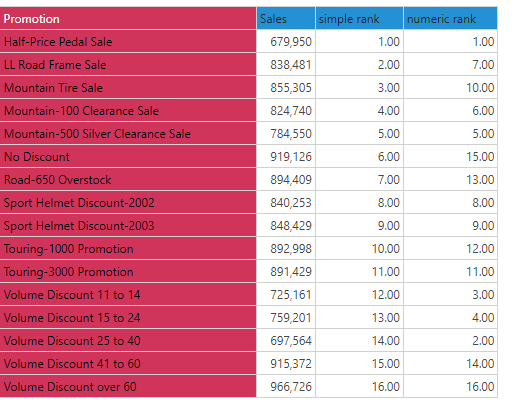
The simple rank (column #5), uses nothing but the promotion item's label ranking by the natural order of the elements of the hierarchy.
Rank( [promotions].[Promotion].CurrentMember(), AllMembers([promotions].[Promotion]), )
Dense Rank
The dense rank (column #6) uses the promotion item's 'return' value and ranks it in the order of the other promotional element returns. Tied elements receive the same rank, but subsequent elements do NOT skip rank levels. So after rank #4, the next item is #5.
Rank( [promotions].[Promotion].CurrentMember(), AllMembers([promotions].[Promotion]), [measures].[transactions returns] ,dense )
Modified Rank
The modified rank (column #7) uses the promotion item's 'return' value and ranks it in the order of the other promotional element returns. Tied elements receive the same rank using the last rank in the group. So after item #9, all 3 tied items get rank #12.
Rank( [promotions].[Promotion].CurrentMember(), AllMembers([promotions].[Promotion]), [measures].[transactions returns] ,modified )
Unique Rank
The unique rank (column #8) uses the promotion item's 'return' value and ranks it in the order of the other promotional element returns. Tied elements receive the unique rank, with a secondary ranking used, based on the natural order of elements.
Rank( [promotions].[Promotion].CurrentMember(), AllMembers([promotions].[Promotion]), [measures].[transactions returns] ,dense )
Percentile Rank
The percentile rank (column #9) uses the promotion item's 'return' value and ranks it on a percentile scale in the order of the other promotional element returns.
Rank( [promotions].[Promotion].CurrentMember(), AllMembers([promotions].[Promotion]), [measures].[transactions returns] ,percentile )
Percentile Rank, descending
The dense rank (column #10) uses the promotion item's 'return' value and ranks it on a percentile scale in the order of the other promotional element returns. In this case, the order of ranking is reversed using the order flag.
Rank( [promotions].[Promotion].CurrentMember(), AllMembers([promotions].[Promotion]), [measures].[transactions returns] ,percentile, desc )