The Security settings in the Model Definition File are applied to the materialized data content created when the model file is run. These security settings determine which users can see the databases or data models and which users can edit them. These permissions are then saved in the model definition file and are materialized into the live database, live data model, or both.
Access to the definition file is defined and managed like all other content files on the system, through tools like the content manager. It can be copied, moved, deleted, shared and secured through the same mechanics that are applied to all other content items in Pyramid.
Set Security
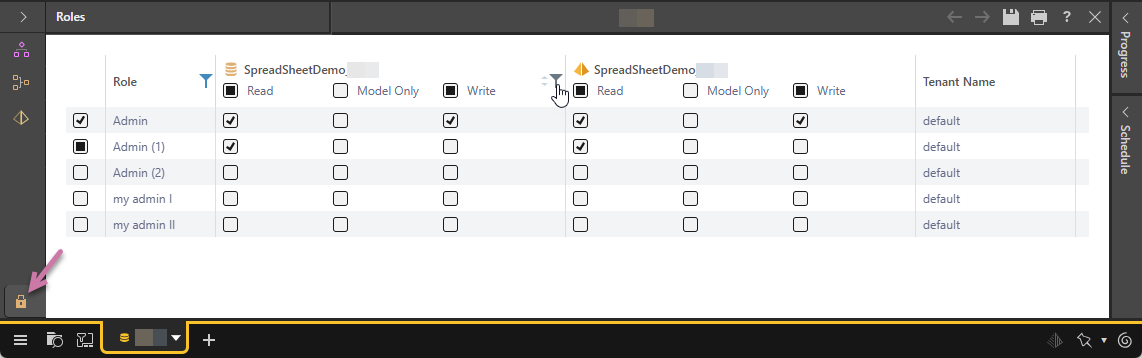
The Security tab is used to assign read and write permissions to the materialized artifacts that are produced after running the definition file. The tab exposes the Model artifacts to be materialized, as well as a list of user roles. You can govern which roles will be able to view and edit your materialized databases, data models, and machine learning models. This allows you to, for example, share your data models with others while restricting read and write access to your databases.
Assign Read, Model Only, or Write permissions to the database or models for a given user role:
- Click here to learn more about saving content
Read
Users belonging to a role that has read access to a database or model can see those materialized artifacts and query the data model.
Note: If the file is saved to your My Content folder, only Read permissions can be granted.
Model Only
Database only. Users belonging to a role that has Model Only access to the database, have access to existing semantic models and not to the underlying data source the database belongs to. This enables users with restricted data permissions to build data models without having access to the underlying data source.
Write
Users belonging to a role that has write access to a database or model can not only see the materialized artifacts but can also edit them from the model definition file.
Note: Write permissions can only be granted if the definition file is saved to a Workgroup or Public folder in the content manager.
Manage Model Security
Once the materialized data artifacts have been created, admins can continue to administer and adjust these security settings through the Data Source Manager while model owners can administer the same security settings through the Materialized Data Manager - albeit with less scope and functionality.