The following topic explains the basic elements of writing functional NLQ questions. A key aspect in understanding the depth and breadth of the NLQ engine is that the different concepts explained below and in the extended NLQ intelligence logic can and should be used in combination - allowing the user to build extremely sophisticated analytical content with fairly straightforward, plain text.
Note: It is important to note that the engines that underlie this functionality may behave slightly differently to each other in response to prompts, since that is the nature of intelligence of the type that is in use. For more information, see Multiple LLM Engines.
General syntax
While the use of modern day large language models (LLMs) can be very forgiving in interpreting natural language, we recommend that your phrases all have correct: elements described below for the best outcomes, especially when using Pyramid internal "portable language model" or PLM:
- Spelling
- Grammar
- Punctuation (Note: This is only really necessary if your phrases are complex or composite.)
If you have used the synonyms framework, there is a less concern for using exacting terms and phrases. However, if there are idiosyncratic phrases and words, users should invest time in configuring some of the synonym options.
Entities
At the most basic level, your questions must include the names of one or more measures / values in the data model you're querying. Typically you would also include one or more columns / hierarchies from the model as well. These are known as "Entities" and they represent the "nouns" you are asking about as part of your analysis.
Examples:
- Single entities - For example "Show sales by product" tells the engine to find two entities - "sales" and "product" - and then attempt to derive a query from that selection.
- Multiple entities - If a question references multiple entities, the engine will attempt to calculate the "Cartesian" result of those entities. For example "Show sales and expenses by promotion" tells the engine to calculate a query showing "sales" and "expense" data for each of the elements in the "product" hierarchy. Extending that to "Show sales and expenses by promotion and gender" tells the engine to calculate a query showing "sales" and "expense" data in the combination of elements of the "product" and "gender" hierarchies.
Your administrator can also ensure that names are treated as synonymous by setting them up in your model's synonym library. For more information, see NLQ in Data Model Management.
Granular Entities and Business Logic
Generally, granular entities or specific elements from your data are not handled reliably. This is because the LLM has no inherent understanding of what you are referring to unless the reference is universally understood. Dates, times, and geospatial locations are usually universally understood and can therefore be handled reliably.
If you want to be able to ask granular questions around specific data elements NOT unique to your organization or data, semantic designers must implement data vectorization through the Vectorization designer tools.
Business logic using metrics from the metrics store will also not be handled well unless the metric store vectorization has been enabled.
Note: These features require specific licensing options
Adding, replacing, and removing entities
Being able to add, replace, or remove content is a key capability needed when you're extending an existing "chat":
- ADD: To add hierarchies and measures, you can simply write "add net profit" to add a measure called "net profit" or "show gender" to add a hierarchy called "gender".
- REMOVE: To remove a hierarchy or measure, write "remove sales", "hide sales", or "remove promotions".
- REPLACE: To replace or swap a hierarchy or measure, write "replace sales with expenses", "replace product category with promotions".
You can also build a composite sentence like "Remove sales and net profit, add cost and promotions".
Analytic Operations and Functions
The following 'basic' analytical functions and operations can be triggered via the NLQ:
- Totals: to simply add totals to the visual, you can add "Show totals". Of course, this is only relevant for grid visualizations
- Filter: to render a filtered listing of items as part of your query. For example "show the top 20 products based on expenses"
- Sort: to sort (or resort) a listing of items as part of the query. For example "Sort products by Sales"
- Pivot: this will trigger the pivot function in Pyramid with a simple command "pivot". The exact treatment depends on the visualization.
Public information
In addition to interacting with your data, you can also ask questions of the Chatbot where the answers and outcomes contain reference to public domain facts and figures. The Chatbot draws those facts and figures from the "domain of public information."
Note: Public information questions are supported in the third-party LLM engines only.
 Example: Use public information in the Chatbot
You can use information in the public domain in your natural language question. For example, my model does not explicitly contain information about which states are in the North East of the United States, but I can ask a question about North Eastern states and get a meaningful response.
For example, if I limit my chat to the "North Eastern states only" my visualization may be limited to those North Eastern states:
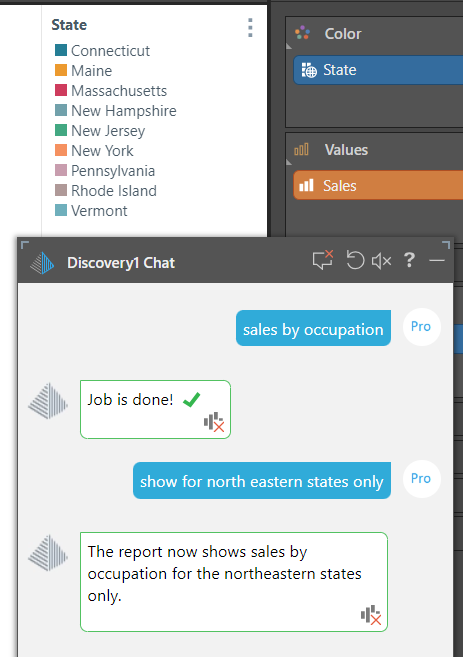
Depending on the LLM Engine that is in use, Pyramid's Chatbot may be able to work out what information relates to which states based on information that is in the domain of public information.
Note: The Legend, in this case, shows you which states are included in the visual.
Advanced intelligence
Incorporate details relating to time, geography, proper nouns, or advanced functions into your requests.
- For more information, see NLQ: Advanced Intelligence
Adjusting Visualizations
Where you are using the Chatbot and Natural Language Querying you can specify or override the type of visual to use.
- For more information, see NLQ: Visualizations