You can incorporate Managed Cloud Platform (MCP) Services and Tools to prove some external capabilities to your Pyramid Agents. These tools allow you to incorporate functionality and data from the third-party services - extending the agent's capabilities that specific to your requirements.
Note: This feature requires specific licensing options
MCP Services and Tools
When you create Agents either in Formulate or using the Bot Wizard in Discover or Tabulate, you are able to view a catalog of MCP services that have been made available to you in the environment. You can select and make use of these services to achieve your intended actions by (optionally) incorporating them into your instructions.
Typically MCP services need to be configured and enabled by admins before they can be used
Purpose
You might get your agent to use MCP Services and Tools for many reasons, including the following examples:
- Ensure platform consistency by relying on standardized, approved services.
- Lower risk of confusion or misconfiguration by using standards-driven sources for particular domain expertise.
- Get the latest information from specific institutions that are responsible for publishing that information.
Using the Tools Functionalities
In Agent builder in Formulate and the Bot Wizard in Discover or Tabulate, you can select MCP Tools or Services for use by the Agent when it is completing its tasks. Whenever you want to incorporate a tool, you need to use the Tool Selector and then, optionally, update your Instructions to reference the tool and provide guidance to your agent on how to use it.
Authorizing MCP Services
Typically, MCP Services need to be authorized for selection by an admin, this adds them to the Tools pages in all of the Agent builder tools.
Selecting MCP Services for an Agent
You can select MCP Services or Tools as follows:
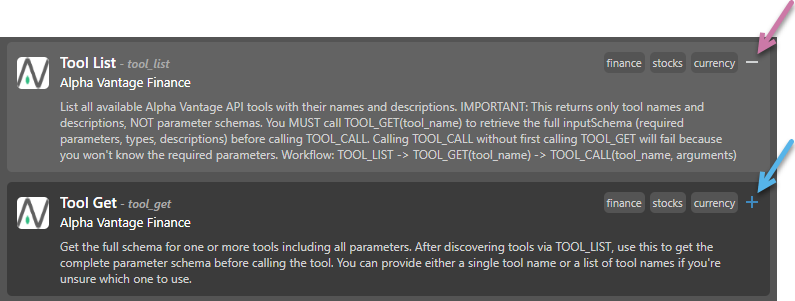
- Click the Plus (+) icon (blue arrow above) to select the Tool you want to add.
- Click the Minus (–) icon (purple arrow) to remove a selection.
Tip: If you want to remove all currently selected MCP tools, you can always click Clear All.
Note: It's important to note that the agent may try to make use of any selected tool, even if it is not explicitly mentioned in the Instructions.