The 'Validate Joins' function runs on a sample of data to check if all the joins in the data flow that are used to connect the tables are valid.
Join validation ensures that the keys joining the two tables match data type and that the cardinality of values in the join columns matches the relationship type (one-to-many, many-to-many, and so on). Getting these incorrectly configured can have a major impact on performance.
Validate All Joins
Validate all joins in the data model using the Validate Joins dropdown list in the ribbon. Open the dropdown list to select the size of the sample (number of rows) to use when validating.

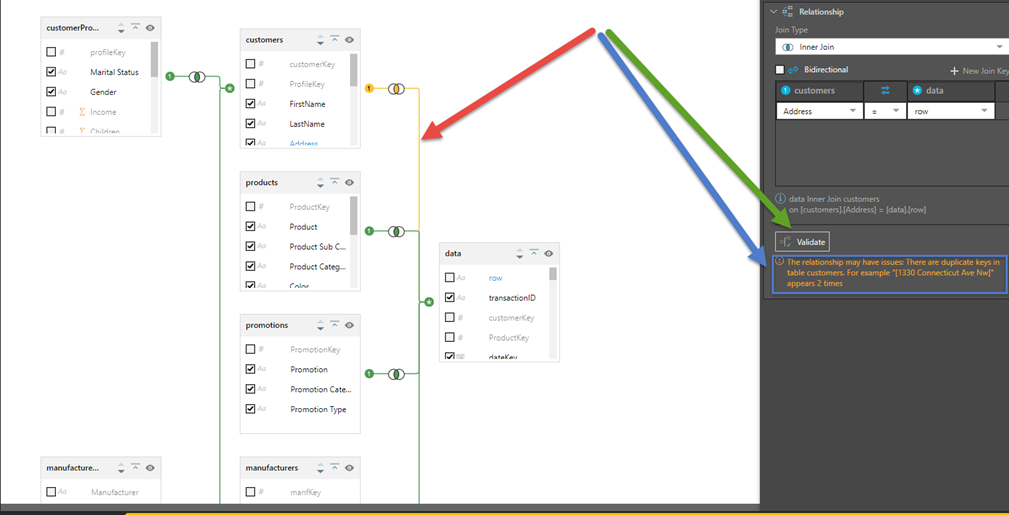
If an error is found, an error message is displayed and the join containing the error is highlighted (Red arrow below). Click the join to view details for the relationship describing the error (blue arrow).
Validate Specified Joins
Joins can be validated individually by clicking on the join and clicking the Validate button (Green arrow). This is particularly useful with large data flows where a user can check an individual join without requiring all the joins to be validated together.
Specified joins can be validated from the:
- Join context menu
- Join Properties panel
Join Context Menu
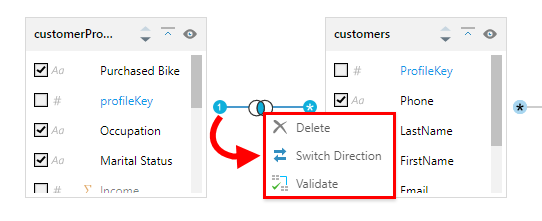
Right-click the relevant join and click Validate from the context menu:
Join Properties Panel
Click the join to open its Properties panel and then click Validate at the bottom of the panel (green arrow above).