If you are working in an environment where Generative AI has been enabled by your administrator, you can add AI Nodes to enable AI-driven functionality in your Master Flow.
Adding AI Nodes
The nodes that are accessed from the AI panel allow you to use AI-driven functionalities as part of your master flow.
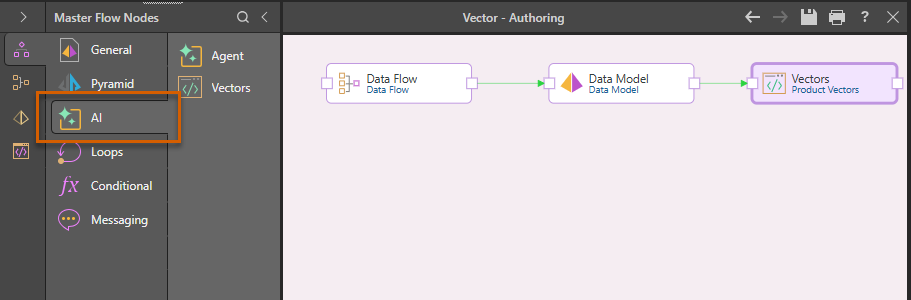
Agent Nodes
Agents allow autonomous AI functions to run as part of Decision Flows. Agents can be used in conjunction with queried result sets, MCP services and "tools," and external data references to auto-analyze data. Based on those results they can trigger subsequent steps in the flow, effectively allowing the agent to drive decisions and perform tasks to achieve specific goals.
The Agent node option will only be visible when build a decision flow.
- Click here for details of the Agent Nodes
Vector Nodes
Creating Vectors (embeddings) on data allows users to ask natural questions using granular data elements and get relevant results from AI agents (via the Chatbot) and LLMs. For example, you could create vectors for your products with related attributes like size to allow the LLM to answer questions like "Which of my large clothing items are most profitable?" The LLM itself doesn't know anything specifically about your data, but the vectors enable it to interpret the question, interact with Pyramid's (MCP) agency and find the right members from your database to be used in queries and analysis. In effect Pyramid and the LLM agent work together, combining natural language understanding, vectorized data, and accurate data retrieval to deliver intuitive answers grounded in private data.
- Click here for details of Vector nodes
Related Information
Administration Tasks
In addition to the day-to-day use of the LLM (above), administrators will also need to enable some Generative AI settings in the Admin Console. This is typically a one-time set up task. For more information, see AI Settings.