Formula Wizard
To make it easier to create and edit formulas and minimize typing and syntax errors, Tabulate provides a Wizard. After you type an = (equal sign) and beginning letters of a function, Tabulate displays a dynamic dropdown list of valid functions, arguments, and names that match those letters. You can then select one from the dropdown list and Tabulate will enter it for you.
For example, typing:
=IF
Displays the following:
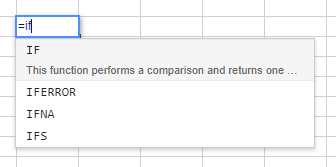
Select the function required and then fill in the required parameters.
=if(
Formula Wizard topics