Use grids to display the given hierarchies, member elements, and measures in a table format. The available grid types include:
Matrix grids display hierarchies and measures as columns and rows, and are highly customizable. Tabular grids display hierarchies and measures and columns; they are similar in appearance to raw data grids, but like matrix grids they can be customized and formatted.
Building Grids
A grid must contain at least one member hierarchy from the dimensions panel, and at least one measure from the measures panel.
Matrix Grid
To build a matrix grid, place the required member hierarchies in the Columns or Rows drop zones. The member elements of the given hierarchies will be displayed as the column and row headers. Add the required measures to the Values zone, and then place the Values chip either in Columns or Rows drop zone.
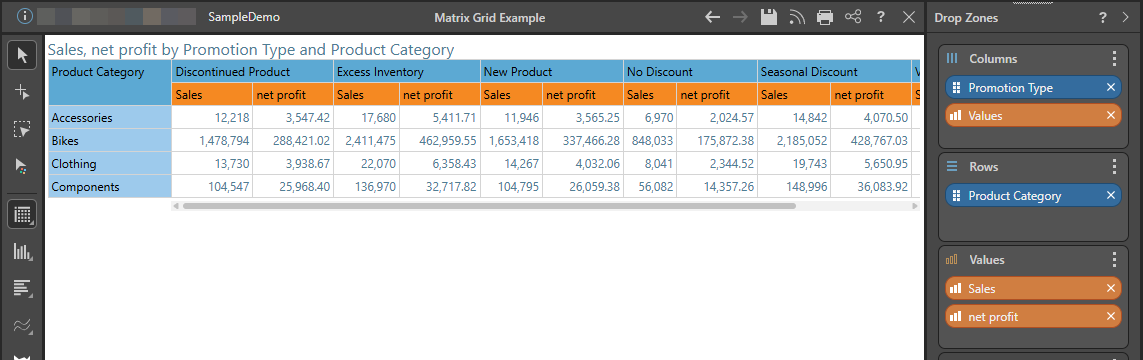
- Click here for instructions for building Matrix Grids
Tabular Grid
To build a tabular grid, add all required member hierarchies and measures to the Columns zone; each chip will be displayed as a column in the table, with the column cells containing the member elements and data.
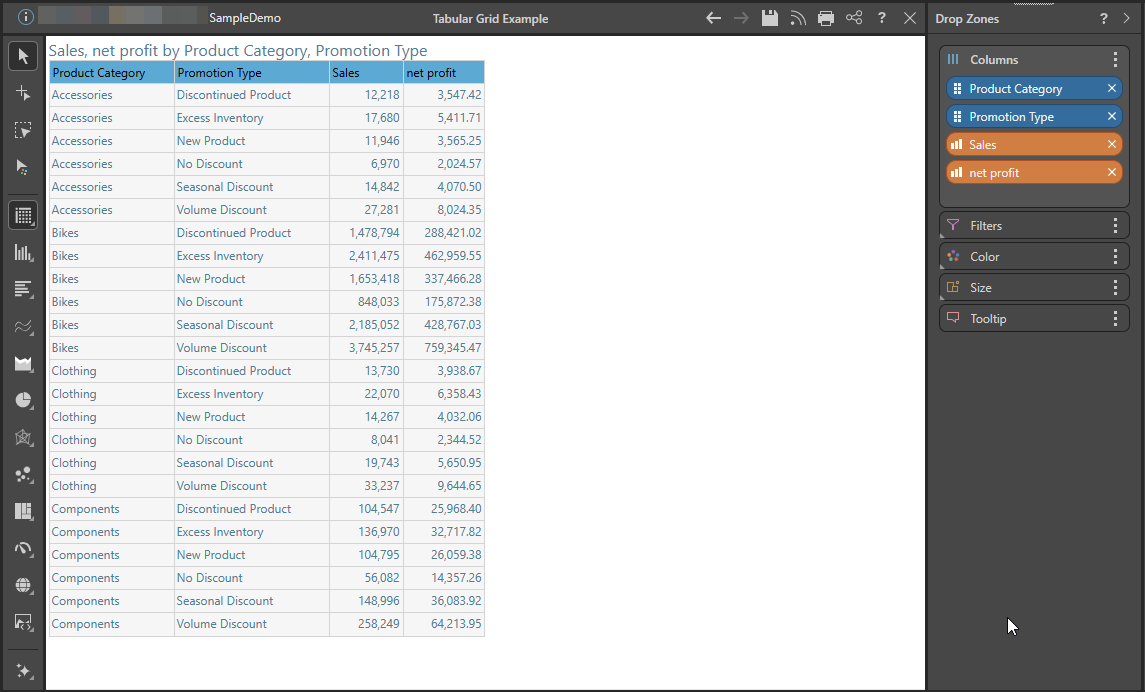
- Click here for instructions for building Tabular Grids