When working with MS OLAP and Tabular data models, SAP HANA and SAP BW data models, and on SQL Sources where translations are defined, the Query Options in the Discover ribbon include the Choose Language option. This option allows users to change the language for metadata and queries; affecting visualizations, trees (dimensions, elements, and measures), and slicer elements in the given report.
Note: This function allows the report to be viewed either in a specifically selected language or in the Application Language. When Application Language is selected, the report automatically renders using the language selected by the user in Pyramid. This setting ensures that users consistently see content in their preferred language.
Changing Language
From the Query ribbon, open the Choose Language dropdown list and select the required option:
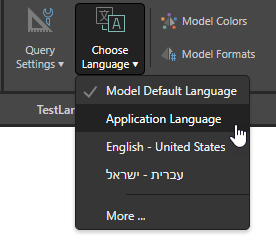
- Model Default Language: Returns the metadata and queries using the model's default language as defined in the data source. In the case of a cube, this is the cube's default language.
- Application Language: Use the Pyramid application language. This language is used across the application and can be configured on a per-user basis in the User Info dialog. If the language exists, an attempt is made to load the model in the current user's preferred language. If the selected language does not exist, the underlying technologies may return the default language or may throw an error (SAP BW only).
- <Language>: Select the supported language that you would like to use. Pyramid reads these languages in the model's definition or detects that they are supported in MS cubes (SAP BW and Hana do not support this).
- More: Open the More dialog to choose a supported language that is not available from the <Language> list. You may need this option in the event language settings that are defined in the cube are not surfaced.
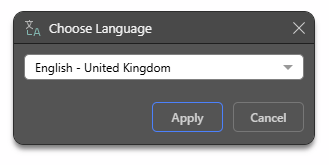
More...
Select the More dialog to choose a language from the fuller list.
Related information
User Defaults
The default language choice from the heuristic options can be driven from the user defaults capability in the admin console and can be overridden by the user's personal default settings. In user defaults, the user can select the default or application options as described above.